
Step 7
Loop
Iterates over the mapped, filtered product list one record at a time, calling the downstream branching chain once per product.
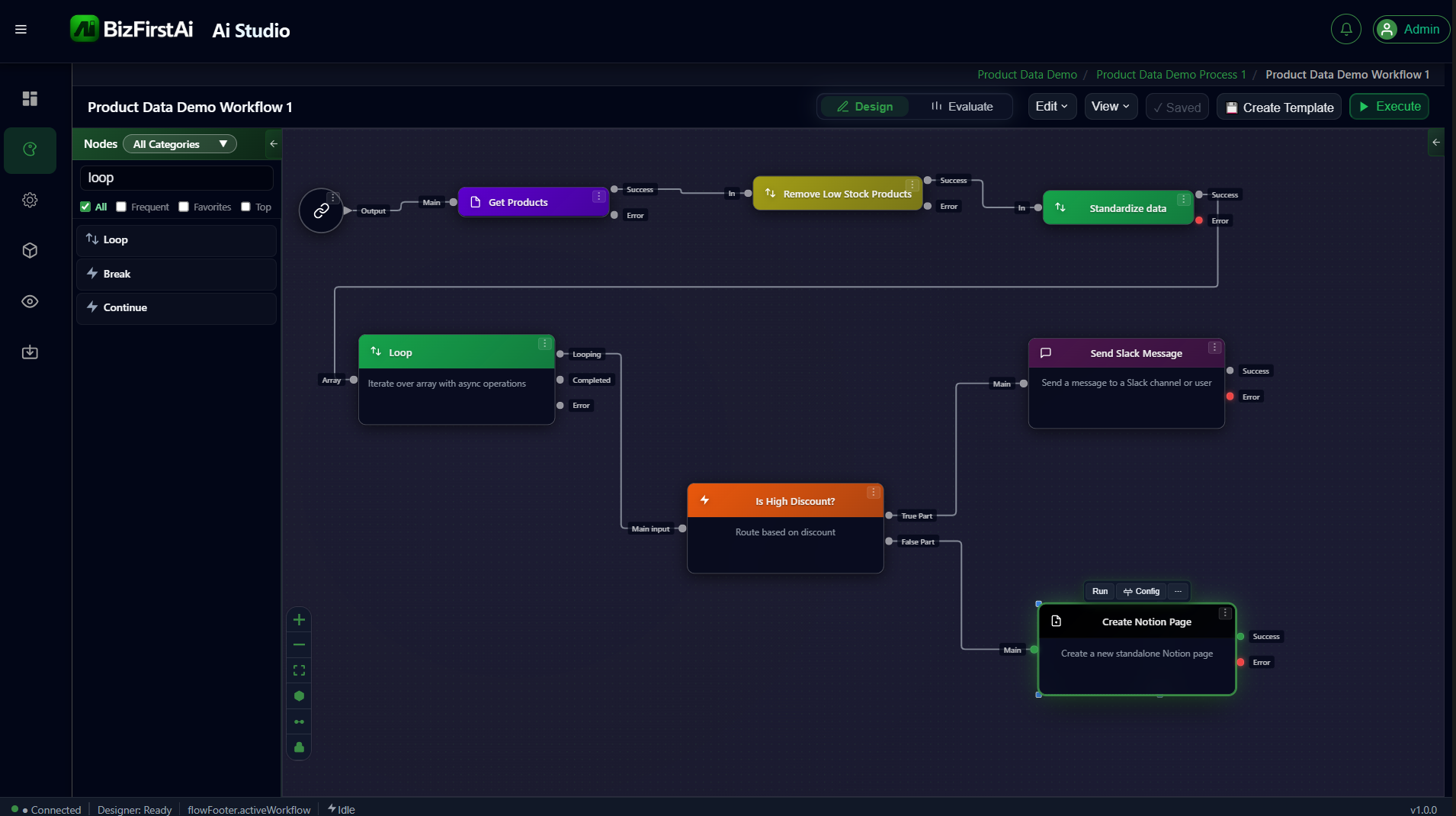
Configuration
The Loop node itself has no fields of its own — it relies on two shared common forms:
Source Data Path (tells Loop what collection to iterate):
| Field | Value |
|---|---|
sourceDataRootPath | nodeOutput.dataMapping |
sourceDataLeafPath | items |
Iteration Configuration (behavior/safety settings) — all left at defaults for this demo: batch size 1 (item-by-item), parallel execution off, break-on-first-error on.
⚠ Open question: which output port fires when?
The live canvas shows the Loop node with two output ports labeled Looping and Completed (plus Error) — description text reads "Iterate over array with async operations". This doesn't match the node's underlying port schema, which defines portKeys
More importantly: in the screenshot above, the line from Completed — not Looping — is what feeds into "Is High Discount?"'s Main input, i.e. the per-item branching chain. Looping isn't connected to anything.
This is the opposite of what was assumed when planning the Memory Store / Run Summary Email pages of this guide (that the per-item chain hangs off the "fires every iteration" port, and a separate "fires once at the end" port feeds the summary email). Before wiring up the Run Summary Email node, test directly: connect something to the unconnected
loop (displayName "Loop") and done (displayName "Done").
More importantly: in the screenshot above, the line from Completed — not Looping — is what feeds into "Is High Discount?"'s Main input, i.e. the per-item branching chain. Looping isn't connected to anything.
This is the opposite of what was assumed when planning the Memory Store / Run Summary Email pages of this guide (that the per-item chain hangs off the "fires every iteration" port, and a separate "fires once at the end" port feeds the summary email). Before wiring up the Run Summary Email node, test directly: connect something to the unconnected
Looping port and observe when it actually fires, to confirm which port is genuinely "once, after everything finishes."
What happens here (once resolved)
Each iteration resets the "current item" as the input for every node in the per-item chain — that's what makes input.discountPercent resolve correctly inside the If Condition node on the next page.